
Illustrated Spelling1.2 - App Store
You'll be able to see results in few seconds.
Publisher Description
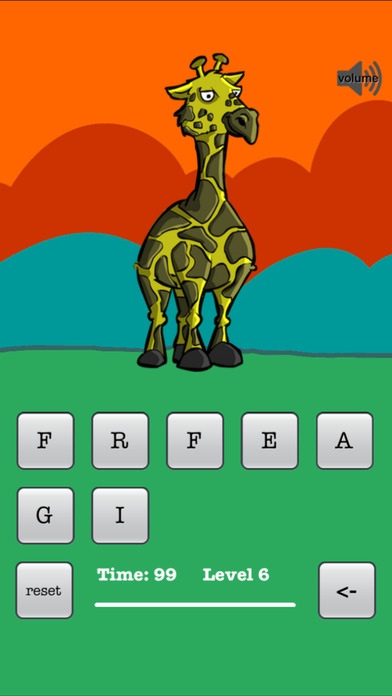
Over 65 beautiful illustrations that kids can enjoy (we hired really great illustrator to create these).
There are toys, zoo and farm animals, vehicles, historical artifacts, different professions and geographical landmarks to make spelling fun. Join your kid and in no time you will be in conversation about interesting things from all over the world.
Kids in 3rd, 4th and 5th grade usually can complete the game with minimal supervision. Younger kids will also love this game if adults are available to help explain, define and spell new words. Kids will quickly learn to instantly recognize and build the words from the letters of the alphabet displayed under each illustration.
Goal of the game is very simple, just get the correct English language spelling for the illustration shown using all letters on the screen. Pronunciation is played when each new illustrated item is displayed.
REWARDS:
At each successful pass of the game, kid earns a new star.
MECHANICS OF THE GAME:
App waits 99 seconds for player to type the word correctly using all characters on the screen. If no correct answer is given, characters are shuffled and word is pronounced again. Reset button lets you do this at any time and hear the pronunciation again.
GAME PROGRESS:
If you desire to set the game back to level 1, close the game and open it again.
On the home screen, there is a gear that takes you to the settings page where you can reset level and stars.
RECOMMENDED AGES:
3rd, 4th and 5th graders and older.
1st and 2nd graders with adult help or older kid supervision.
STAY UPDATED:
Website - http://edin.us
Twitter - @EdinApps
Produced by edin.us
(c) edin.us version 1.2
Requires iOS 6.0 or later. Compatible with iPhone, iPad, and iPod touch.
About Illustrated Spelling
The company that develops Illustrated Spelling is Edin Edin. The latest version released by its developer is 1.2.
To install Illustrated Spelling on your iOS device, just click the green Continue To App button above to start the installation process. The app is listed on our website since 2015-04-14 and was downloaded 0 times. We have already checked if the download link is safe, however for your own protection we recommend that you scan the downloaded app with your antivirus. Your antivirus may detect the Illustrated Spelling as malware if the download link is broken.
How to install Illustrated Spelling on your iOS device:
- Click on the Continue To App button on our website. This will redirect you to the App Store.
- Once the Illustrated Spelling is shown in the iTunes listing of your iOS device, you can start its download and installation. Tap on the GET button to the right of the app to start downloading it.
- If you are not logged-in the iOS appstore app, you'll be prompted for your your Apple ID and/or password.
- After Illustrated Spelling is downloaded, you'll see an INSTALL button to the right. Tap on it to start the actual installation of the iOS app.
- Once installation is finished you can tap on the OPEN button to start it. Its icon will also be added to your device home screen.
Version History
version 1.2
posted on 2015-04-14
Disclaimer
Official App Store Link
We do not host Illustrated Spelling on our servers. We did not scan it for viruses, adware, spyware or other type of malware. This app is hosted by Apple and passed their terms and conditions to be listed there. We recommend caution when installing it.
The App Store link for Illustrated Spelling is provided to you by apps112.com without any warranties, representations or guarantees of any kind, so access it at your own risk.
If you have questions regarding this particular app contact the publisher directly. For questions about the functionalities of apps112.com contact us.
